Agent tools & integration
Connect agents to tools with clear boundaries
A developer's guide to MCP, narrow tool contracts, permissions, and handling an uncertain write without repeating it.
A useful tool gives an agent a narrow capability with a result it can interpret. Connecting to a tool server does not establish permission to use every operation it exposes.
Model Context Protocol (MCP) connects an AI application's host and its clients to servers providing capabilities such as tools, resources, and prompts. The host manages the interaction; a server exposes its supported capabilities. See the official MCP architecture overview for the protocol roles.
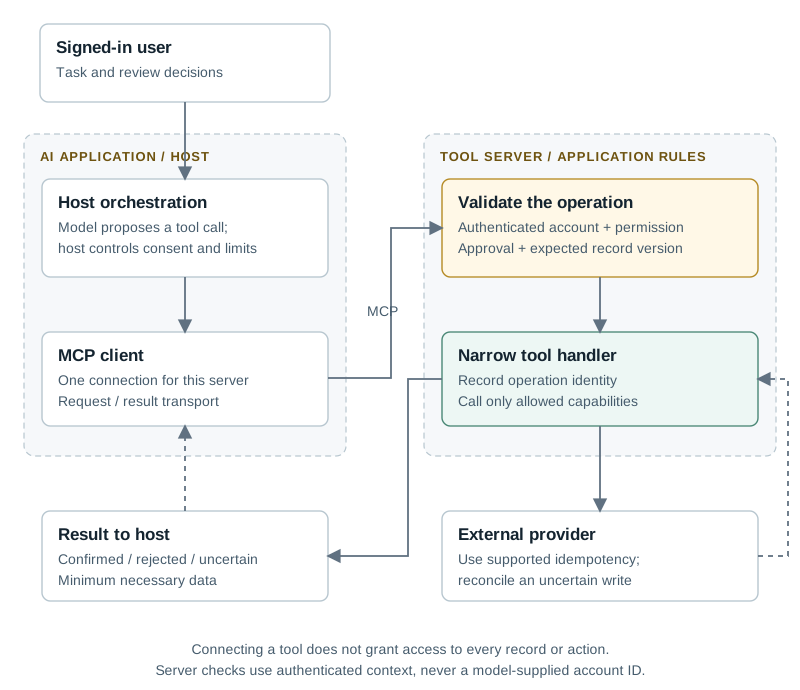
An illustrative MCP write path. The host manages its client connection; the tool server enforces the business operation's rules.
Read the flow
- The signed-in user gives the host a task; model output proposes a tool operation.
- The MCP client transports the call. The server validates account access, permission, approval and record version.
- The handler records an operation identity and calls the provider. It returns a confirmed, rejected or uncertain result without exposing credentials.
1. Design around a business operation
Imagine an assistant helping a team investigate a delayed order. Start with get_order_status, rather than a general database-query tool. Accept an order reference; return the allowed status, last update time, and whether the record was found. Choose field names and descriptions that explain what the tool actually does.
| Tool | Boundary | Useful result |
|---|---|---|
| Get order status | Read within the signed-in user's account. | Status and source timestamp, or a safe not-found result. |
| Prepare an address change | Validate a proposal without changing the order. | Normalized address, proposal ID, and order version. |
| Apply the approved change | Recheck authorization, approval, and current version. | Operation ID and confirmed, rejected, or uncertain outcome. |
2. Keep authorization in the server
Resolve the account from authenticated server context. Do not trust an account or tenant ID supplied by the model. Check record ownership and action permission inside the tool handler. Limit the returned data to what the task needs; a status lookup should not return a customer's full profile.
Validate inputs with ordinary application rules. Treat text returned from an external system as untrusted content. Tool descriptions and prompts help a model choose correctly, but cannot replace access controls, validation, or limits.
3. Make a failed write recoverable
If the address-change request times out, the order may already have changed. Record an operation identity before submitting it and use the provider's supported idempotency mechanism where available. A status lookup or reconciliation step should establish the outcome before another attempt. A local ID alone cannot make an external write safe to repeat.
Return concise error categories the host can act on: invalid input, access denied, version changed, provider unavailable, or outcome uncertain. Keep credentials and internal exceptions out of tool results. Store detailed diagnostics in protected operational logs.
4. Test the boundary, then the agent
Call the handler directly with a different account's order, a stale proposal, a repeated operation ID, and invalid fields. Verify that no unauthorized change occurs. Then test whether the agent selects the right tool, recognizes incomplete information, and handles uncertainty without inventing success.
Release one read-only tool with bounded output and an audit trail. Add a write only after its approval, concurrency, and recovery behaviour are defined and tested.